
Approval Reminder Option Added to Invoice Actions
- We’ve added a new option to the Action Button on the Invoices List: Send Reminder. This allows you to quickly send a reminder to pending approvers when an invoice is waiting for action.
Send Approval Reminders from the Invoices List
Updated Labels in MYOB AccountRight Integration Settings
We’ve updated the field labels in the MYOB AccountRight integration settings to make them clearer and easier to understand:
- Company Login is now MYOB Company File Username
- Company Password is now MYOB Company File Password
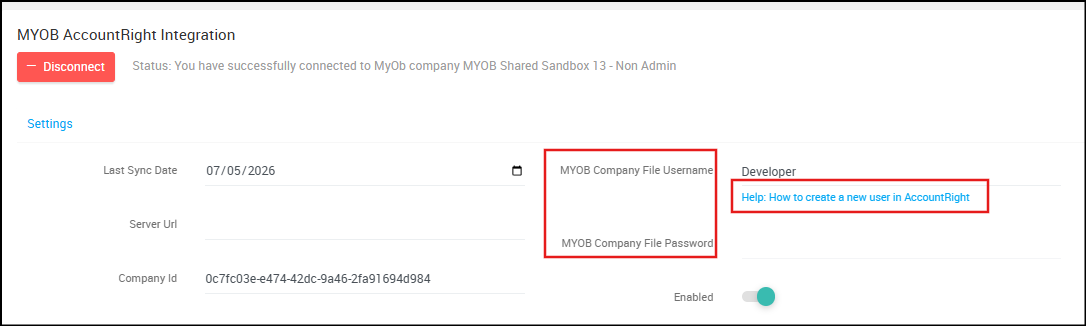
We’ve also added a helpful support link directly within the integration screen: “Help: How to Create a New User in AccountRight”
Password Reset Process Updated
- The password reset option has been removed from the Edit User screen in Ocerra. Users can reset their password only through the standard password reset process using a reset token. Once logged in, users can also update their password from their account settings.
Credit Note Export Warning for MYOB
- Ocerra now displays a warning message when exporting credit notes with mixed positive and negative line values: “Credit note contains mixed line values. MYOB will treat this as a bill.
User List Export & Status Filter
- The User List can now be exported to Excel, including details such as approval limit and user status. We’ve also added a new Status filter, allowing you to easily filter users by: Active and Inactive
Total Amount & Credit Amount in Invoices Folder
- The Displayed Total Amount and Credit Amount are now available in the Invoices folder, providing better visibility into invoice totals and credit values directly from the list view.
Freight Cost Handling – Copy to Line
- We’ve added a new Copy to Line option for freight and other costs. You can now quickly copy any amount captured in the Other Cost field at the header level directly to the invoice line level with a single click, making freight cost allocation faster and easier.