
Applies to: All integrations (Xero, AccountRight, Acumatica, etc.)
Account codes (also known as GL codes) are used to categorise invoice expenses so they are posted to the correct accounts in your accounting or ERP system. In Ocerra, account codes are applied to invoices before they are approved and exported.
Note:
Ocerra syncs Accounts from your system automatically, please note that we don't sync ALL the accounts but only those used in Accounts Payable. If you need any other account type, please let us know we'll sync it for you.
This article explains what account codes are and how they work in Ocerra.
What Are Account Codes?
Account codes are part of your Chart of Accounts and are used to classify transactions such as:
Office expenses
Rent and utilities
Marketing costs
Project or department expenses
Correct account coding ensures accurate reporting, budgeting, and reconciliation in your accounting system.
How Account Codes Work in Ocerra
Ocerra does not create account codes. Instead, it syncs account codes from your accounting system and allows users to apply them to invoices during processing.
Key points:
Only accounts relevant to Accounts Payable are synced
Account codes are applied at the line level on an invoice
Codes must be assigned before export to your accounting system
Where Do Account Codes Come From?
Account codes are pulled directly from your connected accounting or ERP system.
To view synced account codes:
Go to Settings
Select Integration
Open Chart of Accounts
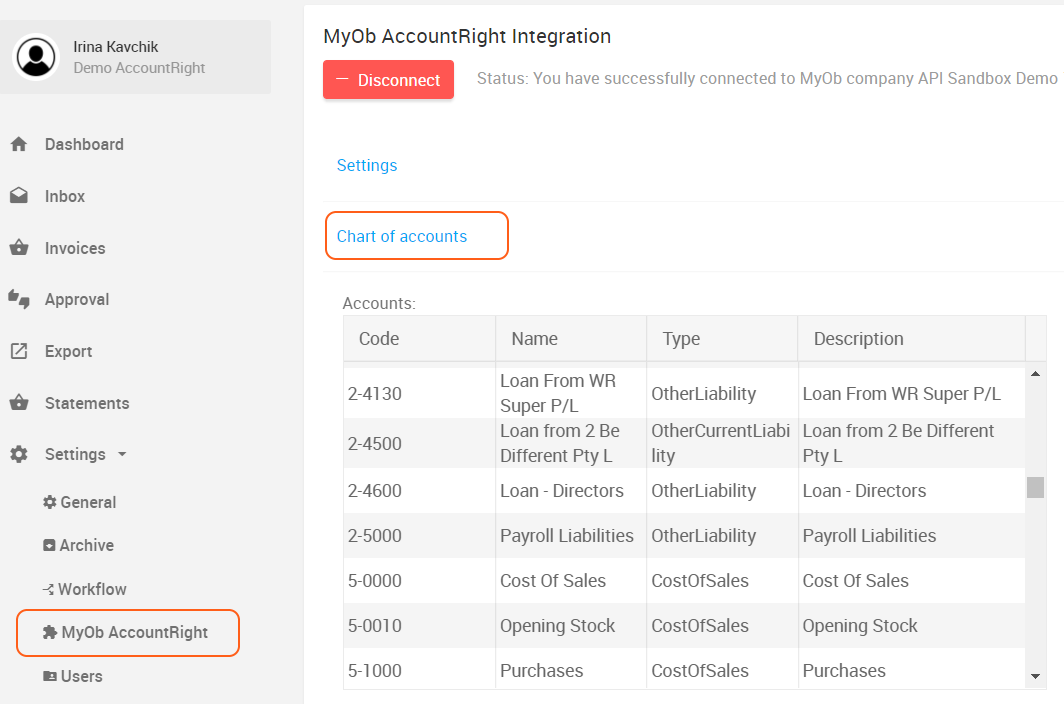
The list shown matches what is available for coding invoices (as shown in the screenshots).
If you create a new account in your accounting system, Ocerra will import it within 20 minutes. Otherwise, you can manually click the sync button to import the details.
Read:
How to apply and manage account codes on invoices
How to sync accounts manually to Ocerra (Xero)