
Overview
- When a supplier is changed, the change is recorded in the Audit Log, allowing you to see who made the change and which supplier was originally assigned. A warning may also be displayed when attempting to change a supplier that has already been automatically matched.
There are three key improvements:
- Supplier changes are recorded in the Audit Log
- A warning is displayed when changing an already-matched supplier
- No warning is displayed for a supplier being matched for the first time
Supplier changes in the Audit Log
Any changes made to the supplier on an invoice are now recorded in the Audit Log.
The audit record includes:
- The user who made the change
- The original supplier
- The new supplier
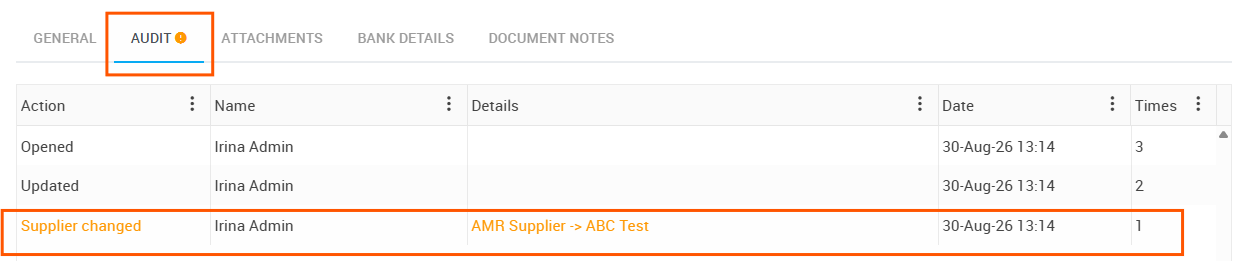
For example, if an invoice originally matched to Supplier A is changed to Supplier B, the Audit Log will record the change from Supplier A to Supplier B, along with the user who made the change.
This provides a clear history of supplier changes and makes it easier to review or investigate changes when required.
Warning when changing an automatically matched supplier
If a supplier has already been automatically matched to an invoice, Ocerra will display a warning when someone attempts to change the supplier.
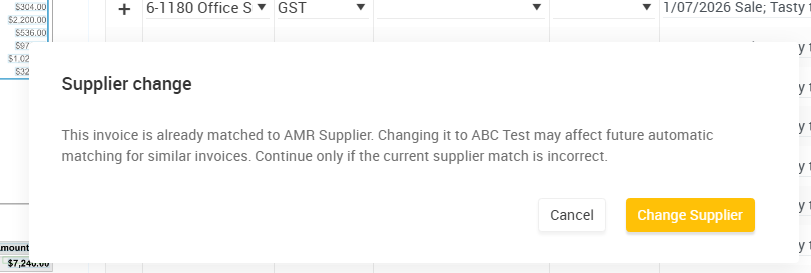
This warning is designed to make users aware that the supplier has already been matched and gives them an opportunity to review the change before proceeding.
The user can then review the invoice and confirm whether the supplier change is intentional.
First-time supplier matching
If a supplier is being matched for the first time, no warning will be displayed.
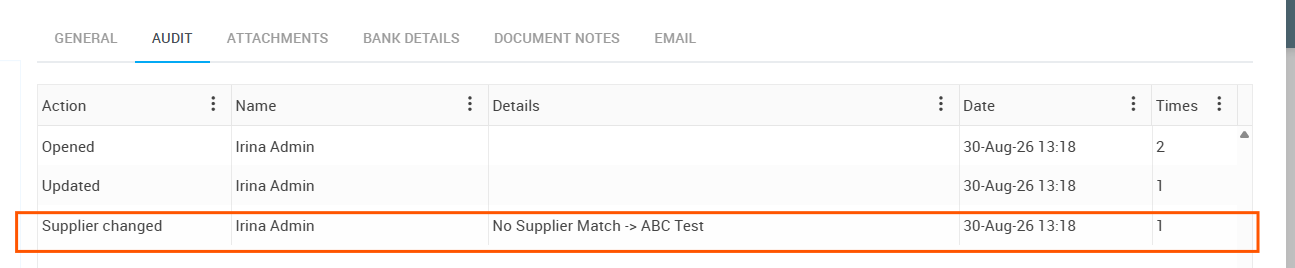
However, the supplier change will still be recorded in the Audit Log.
This means that all supplier changes remain traceable, while warnings are specifically used when there is an existing supplier match that may require additional attention.