
Overview:
Ocerra Purchase Orders (POs) system provides improved control over visibility for users assigned to the Employee role. This update ensures that employees see only the POs that are relevant to their responsibilities, improving both functionality and confidentiality.
What's Changed:
Previously, users with the Employee role could access all purchase orders, regardless of whether they were directly involved in the order or not. With release feature, Employee users will now only see purchase orders that they created or those that have been submitted to them for approval.
How to Enable Employee PO Visibility:
To enable the Employee PO Visibility feature for Purchase Orders:
Navigate to Settings:
In your Ocerra dashboard, go to the Purchase Orders folder.
Click on the Settings tab.
Enable Employee PO Visibility:
In the Settings section, locate the Employee PO visibility toggle.
Switch the toggle to the ON position to enable this feature.
Save the Changes:
After enabling the feature, don't forget to click Save to apply your changes.
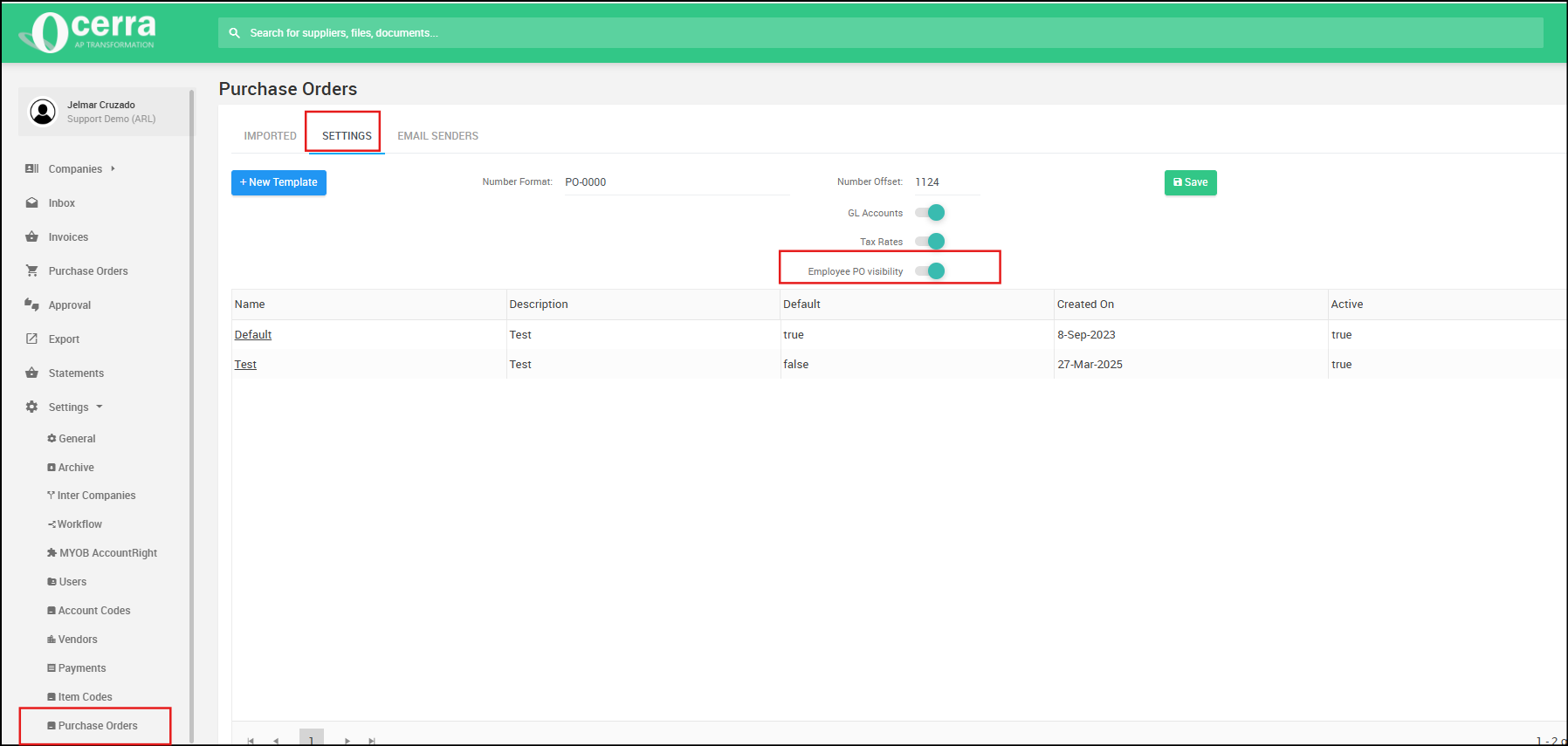
Once this setting is enabled, Employee users will only see the purchase orders that are relevant to their tasks.
How It Works:
Employees will now only see POs they have created or POs that have been submitted to them for approval.
The system automatically filters out any other POs that the employee is not involved in, ensuring a streamlined experience.