
Overview
The ABN Lookup feature allows you to verify supplier Australian Business Number (ABN) details directly within Ocerra. It retrieves live information from the Australian Business Register (ABR) and displays a clear status indicator for each supplier.
This gives your AP team quick confidence that supplier details are valid and up to date - without leaving Ocerra or running separate ABN checks.
Key benefits
Real-time supplier verification using ABR data (refreshed every 24 hours)
Clear visual flags showing ABN and GST status
Quick access to entity details from any invoice
Reduces risk of paying invalid or non-compliant suppliers
No workflow interruption — the lookup is informational only
How to enable ABN Lookup
Go to Settings → General.
Find ABN Service.
Switch it ON to enable the feature.
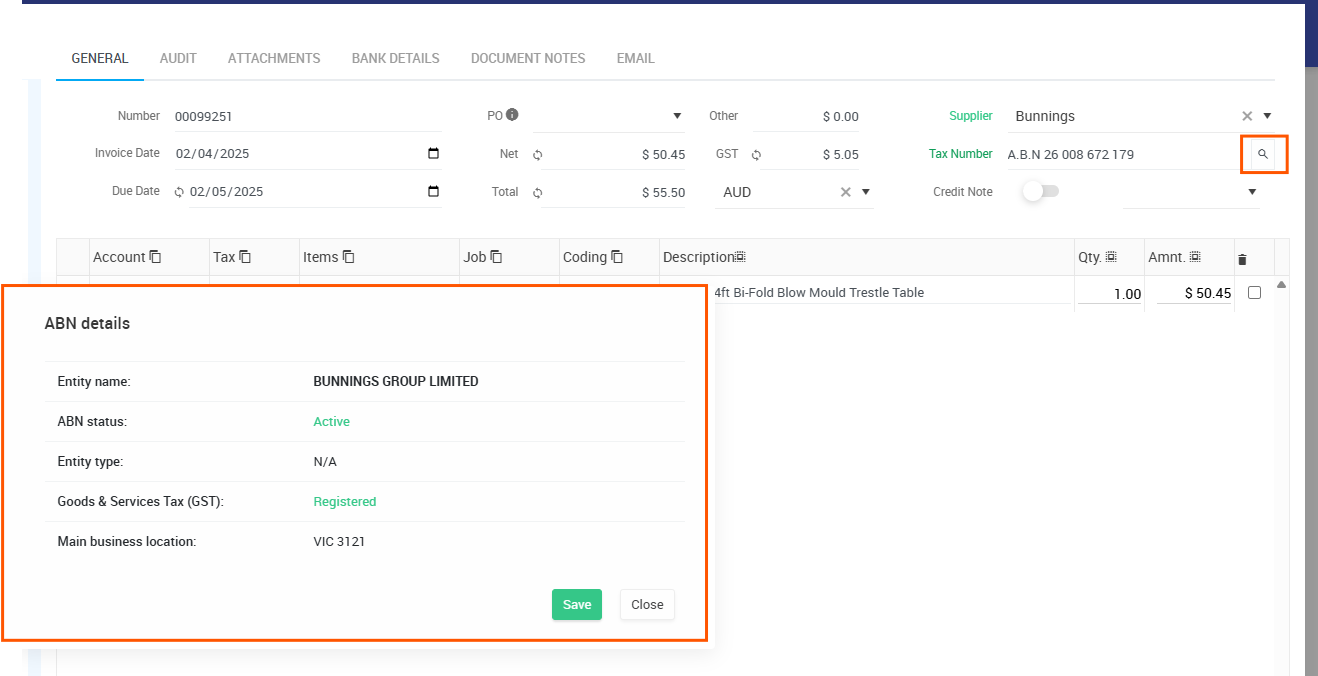
Once enabled, Ocerra will display a magnifying-glass icon next to the supplier’s tax number across the system.
How it works
When ABN Service is enabled:
1. Magnifying glass icon appears
Next to each supplier’s tax number, you’ll see a small search icon.
Clicking this icon opens a pop-up with ABN details retrieved from the ABR.
2. ABN details displayed
The pop-up includes:
Entity name
ABN status (Active or Cancelled)
Entity type
GST registration status
Main business location
All data refreshes every 24 hours.
3. Supplier status flags
Ocerra highlights each supplier with a clear colour indicator:
? Green – Active and GST registered
? Yellow – Active but not GST registered
? Red – Cancelled or invalid ABN
These flags appear for quick visibility but do not restrict invoice processing.